You open a new chat and the assistant remembers your work, your preferred tone or the name of a project. The continuity is useful. It can also create a false mental model: that one stable mind has been privately carrying a humanlike memory of you from conversation to conversation.
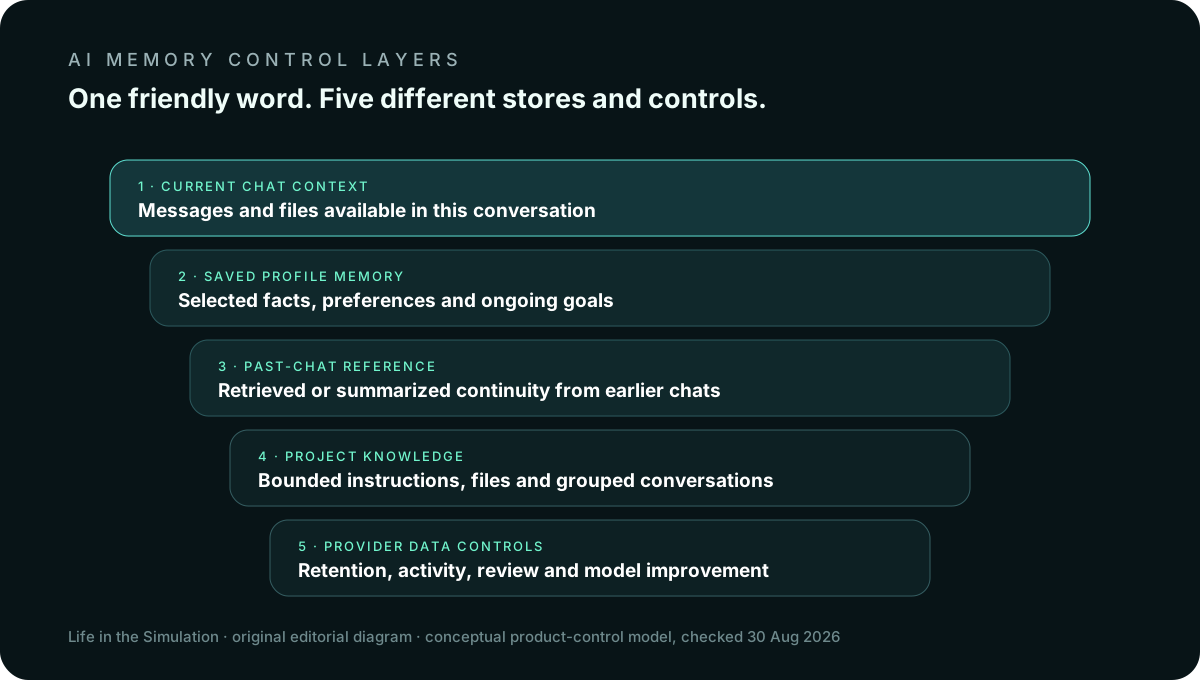
Consumer AI products assemble continuity from several systems. A current conversation supplies context. A saved memory or profile stores selected facts. Past-chat reference retrieves or summarizes earlier exchanges. A project can expose files and instructions. Separate data controls govern retention or model improvement. The word memory compresses those layers into one friendly label.
Five things “memory” can mean
- Current-chat context. Messages and attached material available inside the active conversation. This continuity can disappear in a new chat even when the chat remains stored in history.
- Saved profile memory. Selected facts or preferences retained for future conversations: role, goals, formatting preferences or ongoing work.
- Past-chat reference. A system retrieves or summarizes prior conversations to personalize a new response without placing every old message into the prompt.
- Project or workspace knowledge. Files, instructions and chats grouped inside a project may provide a bounded context distinct from account-wide memory.
- Provider retention and model improvement. Whether data is retained, reviewed or used to improve models is a separate policy and control question. Turning off personalization does not automatically answer it.
ChatGPT: saved memories, chat history reference and temporary chats
OpenAI's current Memory FAQ documents controls under Settings → Personalization → Memory. Depending on account and plan, memory can include saved memories and information referenced from past chats. The settings allow memory to be disabled and saved items to be viewed or deleted.
Deleting a chat and deleting a saved memory are not described as the same action. OpenAI says that fully removing something remembered may require deleting the saved memory and the chat where it was shared. That distinction matters: the conversation is one record; the extracted profile item is another.
Temporary Chat is designed for conversations that should not appear in history or create new memories. OpenAI documents limited retention for safety and says temporary chats are not used to improve models. Its Data Controls FAQ separately explains the “Improve the model for everyone” setting. This is the critical separation: memory, history and model improvement are related but not interchangeable switches.
Claude: generated memory, chat search and incognito separation
Anthropic's memory documentation describes a memory generated from chats, controls to turn it on or off, and a view/edit surface. Availability and administrative control differ for individual and organizational plans.
Anthropic also documents memory import and export. That portability is useful and revealing: the product memory is a maintained representation that can be inspected and moved, not a literal replay of every conversation. Anthropic says Claude's memory is oriented toward work-related context and may not retain every personal detail.
Claude's incognito chats are documented as separate from memory and model-improvement use. The safest interpretation is still narrow: incognito reduces specified forms of persistence; it does not turn a cloud service into an offline notebook or authorize uploading material you are not permitted to share.
Gemini: saved information, past-chat personalization and activity
Google separates instructions or “Saved info” from personalization using memory of past Gemini chats. Its documentation says past-chat memory requires a personal account, age eligibility and Gemini Apps Activity/Keep Activity. Availability can vary by account type and region.
The Gemini Apps Privacy Hub states that saved instructions remain until deleted and that past-chat personalization can use information in activity. It also documents Temporary Chat as a way to discuss material that should not be used for personalization. Deleting a chat is relevant when you want past-chat personalization to stop using that conversation.
Google's activity controls govern whether chats are saved in Gemini Apps Activity, but some account objects—such as created Gems—can have separate persistence. Again, one toggle should not be assumed to erase every object associated with the service.
The practical comparison
ChatGPT
Distinguish saved memories, reference to chat history, project memory, conversation history, Temporary Chat and the separate model-improvement control.
Claude
Inspect the generated memory, understand chat search and project context, use incognito for bounded conversations, and review organizational policy where an owner controls availability.
Gemini
Separate saved instructions from past-chat personalization and Gemini Apps Activity. Account type, age, region and Keep Activity determine which features appear.
Across all three
A conversational answer about what the system remembers is a useful clue, not the authoritative settings record. Product documentation and visible controls outrank the assistant's confident summary.
The 15-minute AI memory audit
- List the layers. Write down chat history, saved memory/profile, projects or Gems, uploaded files, connected apps and model-improvement settings.
- Open the official memory view. Read the saved representation. Remove stale roles, old projects, private facts and preferences that now distort responses.
- Ask the assistant. “What do you currently remember or infer about me?” Compare the reply with the official settings. Treat differences as a reason to investigate, not proof of secret surveillance.
- Review sensitive chats. Search for health, financial, client, child, legal, credential or identity information. Decide whether each chat should remain.
- Delete in both places. When documentation distinguishes memory from chats, remove the saved item and the originating conversation.
- Review projects and files. Remove obsolete uploads and instructions. A deleted memory item does not necessarily delete a project file.
- Set the future rule. Use ordinary chats for reusable, low-sensitivity preferences; temporary/incognito chats for bounded topics; approved enterprise workflows for protected business data.
- Calendar the next audit. Quarterly is enough for most personal use; active professional use may justify monthly review.
What should usually stay out
- Passwords, recovery codes, private keys and authentication secrets.
- Full identity documents, Social Security numbers and complete payment-card data.
- Medical records or genetic information unless a specifically approved service and workflow requires them.
- Client files, appraisal records, personnel data, legal material or trade secrets without authorization and contractual controls.
- Children's identifying information, school schedules, precise routines or private photos without a necessary, consented purpose.
Redaction reduces risk but does not make every dataset safe. A combination of location, employer, rare condition and timeline can re-identify a person even when the name is removed.
Four common mistakes
“It forgot in this reply, so the data is gone.” Retrieval can fail while a record remains stored. Verify in settings.
“I deleted the chat, so it forgot the extracted memory.” Some products explicitly separate those stores.
“Memory off means no retention or training.” Personalization, history, safety retention and model improvement are separate controls and policies.
“Temporary means invisible.” Temporary modes reduce documented persistence but can still involve limited provider retention and normal cloud processing.
The better mental model
Think of AI memory as an editable operational profile attached to a service, not as a confidant's recollection. It may be incomplete, generalized, wrong, plan-dependent and assembled from several stores. That does not make it useless. It makes governance possible.
The broader pattern matches The Extended Mind Is Already Here: external systems can become part of how we remember and act. The price of that convenience is maintenance. Use the account-level review in Personal Data Minimization, and keep the emotional asymmetry described in The Intimacy of Machines visible. A system can feel personally attentive while remaining a configurable product operated on shared infrastructure.
Official sources and volatile details
- OpenAI: Memory FAQ, Temporary Chat FAQ, and Data Controls FAQ.
- Anthropic: chat search and memory, memory import/export, and personalization features.
- Google: past-chat memory, Gemini Apps Privacy Hub, and activity controls.
This is a documentation-based privacy workflow, not a guarantee about backend deletion or legal compliance. Verify the current controls shown in your account, your organization's policy and the provider's applicable terms before entering sensitive information.
END OF FIELD GUIDE 023
Keep the question. Test the model.
Choose the narrowest claim the evidence can carry, then leave room for revision.