The best hardware security key is not the one with the longest protocol list. It is the one that fits your ports, works with the accounts that matter, has a tested backup and does not create a recovery scheme only one person understands.
What a FIDO security key changes
A password can be typed into the wrong site. A six-digit code can be relayed from a convincing fake login page to the real service. NIST's current digital identity guidance therefore does not classify passwords, out-of-band codes or manually entered one-time passwords as phishing-resistant.
FIDO2 combines the W3C Web Authentication standard with the FIDO Alliance's client-to-authenticator protocols. The authenticator creates a different cryptographic credential for each service. The login is bound to the service's domain, so a credential intended for the real site is not simply reusable by an impostor domain. That removes some of the burden from human vigilance.
A key does not encrypt your email, stop malware, protect an already stolen session cookie or prevent a support agent from making a bad recovery decision. It strengthens a specific authentication path.
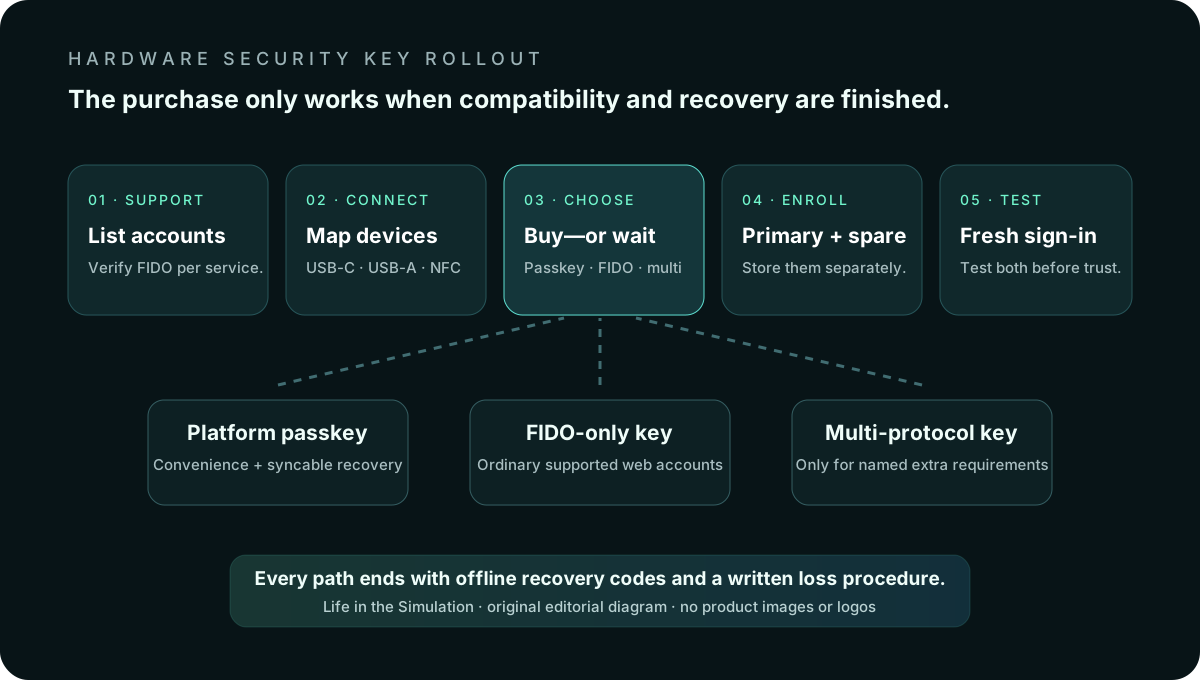
Start with the no-buy option
Modern phones and computers can hold passkeys in platform credential managers. Properly implemented passkeys use the same FIDO foundation and can provide phishing-resistant authentication. Sync makes recovery and multi-device use easier, while a physical key keeps its credential bound to separate hardware.
Do not buy a key merely because “hardware” sounds more serious. A platform passkey may be the better answer when one person uses a well-maintained device ecosystem, the important services support passkeys, account recovery is understood and the physical-key workflow would be ignored.
A separate key earns its inconvenience when you want a credential isolated from the everyday phone or laptop, administer valuable accounts, face targeted phishing, cross ecosystems regularly or need a portable authenticator for shared and replacement devices.
Inventory accounts and connectors before brands
- List the crown-jewel accounts. Primary email, password manager, cloud storage, domain registrar, financial administration and work identity usually come first.
- Open each service's current security documentation. Confirm whether it accepts FIDO2/WebAuthn keys, passkeys, older U2F keys or only app/SMS codes. Do not infer support from a vendor logo.
- List every device used for recovery. Note USB-C, USB-A and NFC. Include the old laptop you would reach for after losing a phone.
- Check account limits. Confirm how many keys can be registered and whether administrators impose restrictions.
- Choose the recovery owner. A family or business system needs another trusted person who knows where the spare and recovery instructions live.
Connector mistakes are operational failures, not minor annoyances. USB-C plus NFC is the broadest simple combination for many current phones and laptops. USB-A remains useful for older desktops. An adapter can help, but it becomes another component that must be available during recovery.
The useful choices
Yubico Security Key Series: FIDO-only and usually enough
The Security Key C NFC by Yubico supports FIDO2/WebAuthn and FIDO U2F through USB-C and NFC. Yubico positions the Security Key Series as its lower-cost, FIDO-only line. For ordinary web-account protection, that limitation is often the reason to buy it: fewer unused enterprise features and a clear job.
Fits: Google, Microsoft, supported password managers and other services that accept FIDO security keys. Skip it when: you specifically need smart-card/PIV, OpenPGP or hardware-generated TOTP. Verify every required service in Yubico's compatibility catalog before ordering.
YubiKey 5 Series: buy only for named extra protocols
The YubiKey 5C NFC adds protocols including OATH-TOTP/HOTP, PIV smart card and OpenPGP alongside FIDO2/U2F. That can matter for enterprise login, certificate use, SSH/OpenPGP workflows or storing one-time-code seeds on the key.
Fits: a person or organization with a written requirement for one of those additional protocols. Skip it when: the plan is simply “protect my web accounts.” Paying for protocol breadth does not improve a FIDO login that the cheaper key already handles.
Google Titan: simple hardware for a Google-centered setup
Google's Titan Security Key is built on FIDO standards and is offered in USB-A/NFC and USB-C/NFC versions. Google says it works with its Advanced Protection Program and with many FIDO-compatible apps and services. The current store documentation describes a purpose-built secure element and mobile use through supported USB or NFC connections.
Fits: a Google-centered household or a person enrolling in Advanced Protection who wants a straightforward first-party option. Skip it when: you need YubiKey 5's non-FIDO protocols or have not confirmed that non-Google accounts support the key.
One key is a demonstration; two keys are a system
Google's Advanced Protection guidance recommends adding a second key as a backup. The same operational logic applies elsewhere. Enroll the primary and backup during the same session. Test both before removing an older sign-in method. Store the backup away from the primary—not on the same key ring, laptop bag or desk.
Save recovery codes offline where the trusted recovery owner can reach them. Do not photograph the codes into the same cloud account they are meant to recover. Label a spare so its purpose is clear without writing the account password or a complete list of protected services on it.
The safe rollout sequence
- Update the account first. Confirm recovery email, phone and trusted contacts are correct. Remove stale routes you no longer control.
- Enroll two authenticators. Register the everyday key and the off-site backup. Give them distinct names in the account settings.
- Capture recovery codes. Print or write them clearly. Record the date and which account they belong to.
- Test a fresh sign-in with the primary. Confirm the connector/NFC path works on the device you actually use.
- Test the backup separately. A key that was never tested is inventory, not recovery.
- Review fallback methods. Remove weak options only after confirming the service's recovery process and the real needs of every account user.
- Document the loss procedure. Write where the backup lives, how a lost key is removed from accounts and who is authorized to do it.
Repeat the test after replacing a phone, changing browsers, moving between operating systems or receiving an enterprise policy change. The password-manager guide covers the adjacent vault and family-recovery decisions; the data-minimization protocol reduces how many neglected accounts require protection.
What not to buy
- Do not buy one expensive key instead of two suitable keys. Feature breadth does not substitute for a backup.
- Do not buy by connector alone. A USB-C shell does not prove FIDO certification or service compatibility.
- Do not buy a biometric key automatically. Biometrics can improve local activation, but add cost and another implementation to evaluate.
- Do not buy old stock casually. Hardware firmware usually cannot be upgraded like an app. Check the exact model and current vendor security advisories.
- Do not buy before checking account support. The key cannot upgrade a service that refuses to accept it.
Who should buy—and who should wait
Buy now
You administer domains, primary email, password-manager or business accounts; face targeted phishing; move between device ecosystems; or want a separate recovery credential and will maintain two keys.
Use a platform passkey first
Your important accounts support passkeys, your devices are well maintained, recovery is understood and the extra physical object would add more failure than protection.
Wait
The only account you want to protect does not support FIDO, you cannot name a secure place for the backup, or another household user would be locked out by a setup they did not help design.
Official sources and volatile details
- NIST SP 800-63B: Authenticators and phishing resistance.
- FIDO Alliance: FIDO2 and passkey specifications overview.
- Google Advanced Protection FAQ.
- Yubico product and compliance documentation.
Check the exact service, operating system, browser, connector, model and firmware before purchase. This guide is consumer education, not an enterprise compliance determination or a guarantee that any named service will continue supporting a key.
END OF FIELD GUIDE 019
Keep the question. Test the model.
Choose the narrowest claim the evidence can carry, then leave room for revision.