The feed is not the problem because it contains links. The problem is that most modern feeds are infinite, personalized and optimized by signals you cannot fully inspect. RSS changes the contract. You subscribe to sources. New items arrive in chronological or explicitly filtered order. When the unread list ends, it ends.
That does not guarantee truth, balance or restraint. You can build an RSS reader containing 800 sources and recreate the same anxious stream by hand. The useful question is not “Which app has the most features?” It is “Which reader supports a small, inspectable information system I will actually maintain?”
What RSS changes—and what it does not
RSS and Atom are syndication formats. A publisher exposes a machine-readable feed containing recent items; a reader checks the feed and presents what changed. The open RSS 2.0 specification and the IETF's Atom standard define the exchange. The reader does not need a recommendation model to know which source to poll.
This improves source custody, not source quality. A false outlet remains false in RSS. A prolific outlet can still dominate attention. Some feeds contain full articles; others expose excerpts and require a visit to the publisher. Newsletter imports and feeds synthesized from sites without RSS may route content through additional services. Treat the architecture as legible, not automatically private.
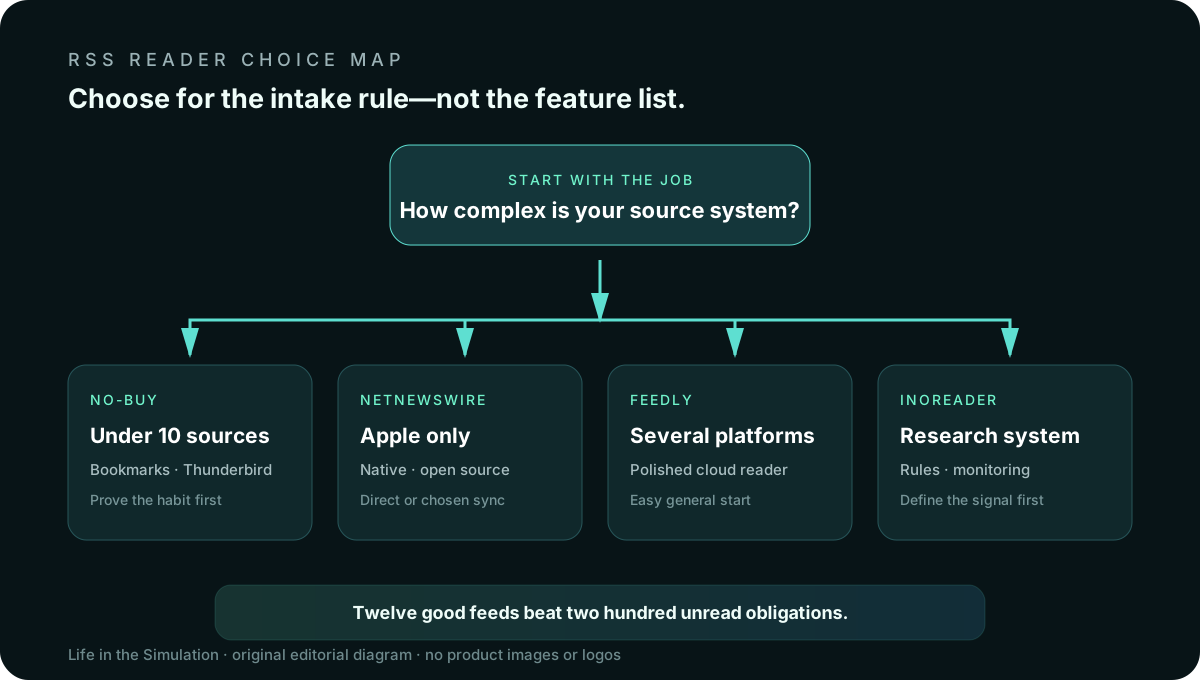
Decide by five constraints
- Platform. Do you need a web reader everywhere, Android support, Apple-only native apps or one desktop?
- Selection complexity. Will folders and unread counts suffice, or do you need rules, keyword monitoring and newsletter feeds?
- Custody. Are you comfortable storing subscriptions and reading state with a cloud service, or do you prefer direct retrieval and open-source clients?
- Exit. Can you export subscriptions as OPML and move without rebuilding the list manually?
- Stopping behavior. Does the interface help you finish a bounded review, or invite endless discovery and saving?
Feedly: the approachable cross-platform default
Feedly News Reader provides web, iOS and Android access, folders, boards, search and newsletter support across its plan structure. The official documentation describes Free, Pro and Pro+ tiers, with more advanced search, integrations, AI feeds and RSS-building tools assigned to paid plans.
Fits: a person who wants one account across work and mobile devices, needs an easy first import and does not want to operate infrastructure. Tradeoff: advanced filtering and AI discovery can shift the tool away from a simple chronological reader. Cloud convenience also means the service holds the subscription graph and reading state associated with the account.
Start free. Import no more than 20 high-value sources. Use one folder for “must read” and one for “when time allows.” Do not upgrade because the dashboard offers a capability; upgrade only when a repeated task—searching an archive, following newsletters or building a specific feed—has become measurable friction.
Inoreader: rules and monitoring for a defined research job
Inoreader combines RSS with filters, rules, monitoring feeds, newsletter ingestion, web-change tracking and integrations. Its official pricing comparison documents a free plan and a Pro tier with expanded subscriptions and automation features.
Fits: researchers, professionals and enthusiasts who can state the signals they need to catch—regulatory changes, a narrow technical field, selected newsletters or mentions across many sources. Tradeoff: it is easy to build an elaborate intake machine whose maintenance exceeds the value of the information. Monitoring is not understanding, and keyword rules can produce a false sense of coverage.
Use rules only after two weeks of manual triage. Write each rule as a sentence first: “Highlight notices from these three agencies containing this term.” Review false positives monthly. A rule whose purpose cannot be explained should be deleted.
NetNewsWire: a native, open-source Apple route
NetNewsWire is a free, open-source reader for Mac, iPhone and iPad. Its official site documents direct feed downloading, iCloud support and optional synchronization with services including Feedly and Inoreader. The source code is publicly available, and the application supports folders, starred items, Reader view and keyboard navigation.
Fits: an Apple-only setup that values a native client, minimal commercial pressure and the ability to retrieve feeds directly or choose a separate sync service. Tradeoff: it does not solve Android, Windows or web access by itself. Using a third-party sync account changes the custody story; open-source software does not make every connected service local.
The no-buy option: bookmarks, email and Thunderbird
If you follow fewer than ten slow sources, a bookmark folder opened twice a week may be enough. Some publishers offer clean email digests. Thunderbird supports RSS feeds alongside mail without requiring a separate reader subscription. The no-buy route wins when your real problem is weak source selection rather than delivery.
Do not add a tool merely to avoid the harder editorial decision: which sources deserve recurring access to your attention?
Decision table
Feedly
Best general starting point when web and mobile access matter. Begin with the free tier; treat advanced discovery as optional.
Inoreader
Best when rules, monitoring, newsletters or a research archive serve a named job. Requires the most discipline against system sprawl.
NetNewsWire
Best for Apple users who want a free native client and can accept Apple-only coverage or pair it with a chosen sync service.
No-buy
Best for a small source list, uncertain habits or anyone who has not yet written an intake schedule.
A 30-minute setup that resists feed sprawl
- Write the job. “I want one calm place to check local reporting and three technical fields twice a day.”
- Choose 12 sources. Four primary or institutional sources, four reliable reporting sources, four slow-analysis sources.
- Create three folders. Required, useful and leisure. Avoid topic taxonomies until volume proves the need.
- Import or subscribe manually. Confirm the feed belongs to the intended publisher.
- Set two review windows. For example, 15 minutes after breakfast and 20 minutes late afternoon. Disable optional push alerts.
- Choose a discard rule. Mark all older than seven days read. Unsubscribe after three weeks of repeated skipping.
- Export OPML. Save a portable backup after the list stabilizes.
How a calm reader becomes another noisy feed
- Subscription inflation: adding every interesting source because storage appears free.
- Unread debt: treating unread counts as obligations rather than a queue you control.
- Automation theater: building filters before understanding which items are actually valuable.
- Source monoculture: following many outlets that repeat the same wire story or institutional perspective.
- Read-later burial: saving more than you can revisit and mistaking capture for learning.
Pair the reader with the source tiers and intake limit in Build a Personal Information Diet. If compulsive checking remains the issue, simplify the environment before escalating to the enforcement options in Website Blockers for Focus. RSS changes selection; it does not supply self-command.
Official sources and volatile details
- Feedly News Reader and plan comparison documentation.
- Inoreader features and official plan limits.
- NetNewsWire platform and synchronization documentation.
- RSS 2.0 specification and Atom RFC 4287.
Confirm current prices, platform versions, feed limits, export behavior and privacy terms on the official pages before paying. This comparison evaluates documented workflows, not security guarantees or hands-on performance.
END OF FIELD GUIDE 022
Keep the question. Test the model.
Choose the narrowest claim the evidence can carry, then leave room for revision.