A standard mouse moves across the desk. A vertical mouse changes hand orientation but still travels. A trackball stays put while fingers or a thumb move the ball. Those mechanical differences are real. Claims that one category is universally healthier, faster or more precise are not.
Choose a pointing device as part of a workstation. Reach, desk height, keyboard width, chair position, task duration, hand size, dominant hand, operating system and software can matter more than the category printed on the box. Pain, numbness or weakness deserves qualified medical or ergonomic assessment; shopping is not diagnosis.
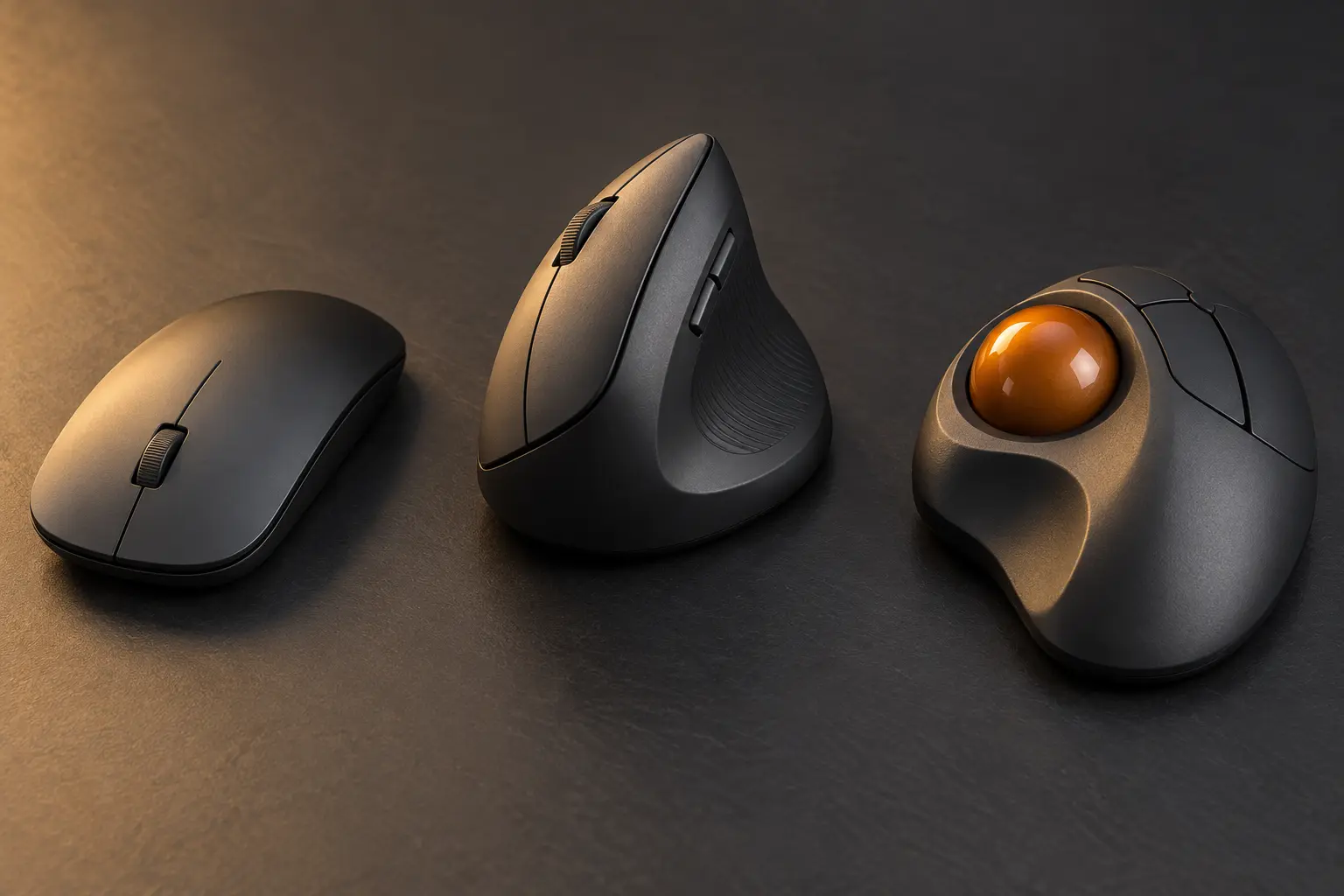
The three architectures
| Category | Movement | Often fits | Watch for |
|---|---|---|---|
| Standard mouse | Hand and device travel over the surface | General work, portability, gaming, broad model choice | Reach, gripping, desk area and side-to-side repetition |
| Vertical mouse | Hand and device travel with a more rotated grip | Users who prefer that forearm orientation and can match the shell size | Height, hand fit, button reach, adaptation and left-hand availability |
| Trackball | Device stays still; thumb or fingers move the ball | Tight desks, fixed stations and users who prefer low arm travel | Learning curve, ball location, cleaning and task-specific precision |
None of these rows establishes a medical outcome. OSHA's computer-workstation guidance emphasizes neutral wrist posture, placing the pointer close enough to avoid reaching, keeping controls easy to activate, and changing work or position to reduce repetitive exposure. A different mouse can support those goals, but it cannot repair a desk that forces the shoulder outward or a workflow with no variation.
Fix reach before buying a shape
Put the keyboard where the forearms and wrists can remain reasonably neutral. Then place the pointer beside it at the same level and close to the body. A full-width keyboard can push a right-side mouse farther away because the number pad occupies the nearest space. A compact keyboard may recover that space without changing the pointer.
Check the whole path: shoulder relaxed, elbow near the body, forearm supported appropriately, wrist not sharply bent, and device reachable without leaning. OSHA specifically warns that a pointer placed too far away can create repeated reaching. If moving the device inward solves the problem, buying a new category may not.
When a standard mouse is enough
A conventional mouse remains the baseline because it is available in many sizes, weights, button layouts and connection types. It is easy to move between desks and familiar to most users. For occasional work or a well-fitted setup, the current device may be entirely adequate.
Look beyond peak DPI. Office pointing rarely needs an extreme sensor number. More useful checks are physical size, grip pressure, reliable tracking on the actual surface, scroll behavior, click force, cable drag or wireless stability, and whether essential buttons work without vendor software. A lighter device is not automatically better; it changes how much force starts and stops movement.
Do not buy a gaming mouse solely for a large sensor specification if the extra controls, software, shape and weight do not serve the task. Do not buy a tiny travel mouse for all-day work simply because it fits the bag.
What a vertical mouse changes
A vertical mouse rotates the shell so the hand approaches a handshake-like orientation. The device still moves across the desk, so surface area and reach remain relevant. The taller body makes shell size and button placement especially important. A model that is too large can force stretching; one that is too small can produce a tight grip.
Use manufacturer specifications to check dimensions, handedness, receiver type, Bluetooth support, operating-system compatibility and customization requirements. Logitech's current Lift for Business specification, for example, lists separate right- and left-hand versions, a USB-A receiver and Bluetooth Low Energy, with customization software on Windows and macOS. That is a compatibility example, not a ranking or evidence that the product fits your hand.
A vertical device may feel immediately comfortable, awkward or simply different. Give it a bounded trial for real work, but do not force adaptation through pain. Preserve the original device during the return window.
What a trackball changes
A trackball stays stationary. That can help on a narrow desk, a tray, a mobile workstation or any setup where sweeping the device is inconvenient. The cursor comes from rotating a ball with the thumb or fingers, depending on the design.
Thumb and finger trackballs are not equivalent. Ball size, location, scroll method, button access and hand support change the movement pattern. Logitech's current ERGO M575 for Business specification describes a removable thumb ball, Bluetooth and a USB-A receiver; Kensington's Orbit line demonstrates the separate finger-ball and scroll-ring architecture. Use those links to see category differences, not as universal recommendations.
Trackballs need cleaning because the ball and bearings collect debris. Confirm that removal and maintenance are documented. If the task depends on rapid large movements, pixel-level selections or unfamiliar software, trial the exact work rather than assuming stationary means precise.
Compatibility is more than Bluetooth
- Host connection: wired USB, USB receiver or Bluetooth—and the exact port or adapter required.
- Basic support: movement, primary click and scrolling on every target operating system.
- Advanced controls: side buttons, gestures, profiles and remapping may require vendor software.
- Managed devices: workplaces may block drivers, pairing or customization apps.
- Multi-device switching: confirm how many hosts, how selection works and whether state follows the hardware or app.
- Power: replaceable or rechargeable battery, charging connector and whether the device works while charging.
- Recovery: keep a wired or known-good pointer available when pairing or software fails.
If one desk serves two computers, resolve that architecture with the KVM, USB switch and dock guide. A mouse advertised for multiple devices does not automatically move the keyboard, display or files.
Run a no-drama trial
Use the same set of tasks for each candidate: thirty minutes of navigation and text work, a spreadsheet, a drag-and-drop sequence, precise selection and any specialized application. Record reach, grip tension, button mistakes, cursor corrections, shoulder position, fatigue and software friction. Do not convert one pleasant first hour into a medical claim.
Change one major variable at a time. If you replace the chair, desk height, keyboard and mouse together, you will not know which change helped or harmed. The one-person experiment protocol offers a low-risk baseline, repeated periods and a stop rule.
The no-buy sequence
- Move the existing pointer closer and remove clutter that forces reaching.
- Adjust pointer speed so ordinary movement does not require repeated edge lifting.
- Relax grip and confirm that buttons activate without excessive force.
- Try keyboard shortcuts for repetitive navigation and selection.
- Alternate tasks and positions rather than holding one posture indefinitely.
- Borrow a different size or architecture before committing.
Pair the result with the keyboard guide. The two devices share the same reach zone, and optimizing one while displacing the other is not a win.
A nine-field buying card
| Field | Write before shopping |
|---|---|
| Task | Navigation, precision, gaming, creative work or mixed use |
| Duration | Occasional, mobile or sustained desk work |
| Reach | Available zone beside the actual keyboard |
| Hand fit | Size, handedness, grip and button access |
| Movement | Arm travel, vertical grip, thumb ball or finger ball |
| Connection | Cable, receiver, Bluetooth and ports |
| Software | Required OS, permissions, remapping and profiles |
| Maintenance | Battery, charging, cleaning and replacement parts |
| Exit | Return window, fallback device and stop rule |
Claims and boundaries
Sourced fact: OSHA recommends placing the pointer close to the keyboard and maintaining neutral wrist posture, and it encourages task variation. Manufacturer fact: the linked product pages describe current dimensions, connections, controls and software requirements for specific models; those details can change. Inference: category choice works best after reach and compatibility are traced through the whole workstation. Not claimed: a mouse treats an injury, one architecture prevents musculoskeletal disorders, or the pictured generic devices were tested.
Official and manufacturer references
- U.S. OSHA: Computer Workstations—Pointer/Mouse, for placement, reach, control and neutral-posture guidance.
- U.S. OSHA: Good Working Positions, for whole-workstation positioning and variation.
- Logitech: Lift Vertical Ergonomic Mouse for Business specifications, a current vertical-mouse compatibility example.
- Logitech: ERGO M575 for Business specifications, a current thumb-trackball compatibility example.
- Kensington: Orbit Trackball with Scroll Ring, a current finger-trackball architecture example.
END OF FIELD GUIDE 077
Keep the question. Test the model.
Choose the narrowest claim the evidence can carry, then leave room for revision.