Printer shopping often starts with a sale price and ends with years of consumables, maintenance and connection friction. Reverse the process. Write down the pages you actually print, the devices that must reach the printer, the monthly volume, the longest idle period and whether color means charts or photographs. Then choose the printing system.
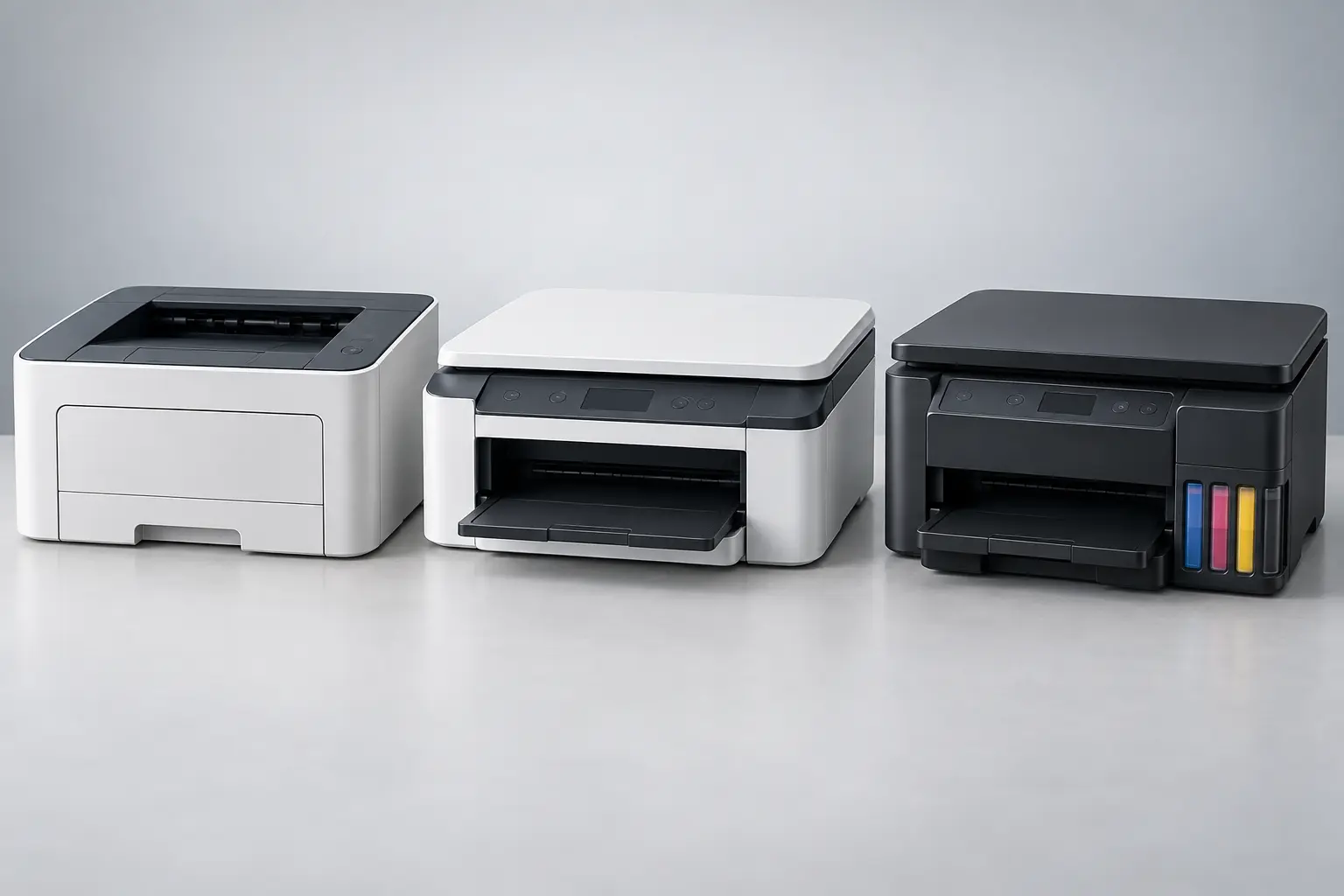
This guide compares three broad categories: monochrome or color laser printers that use toner, cartridge inkjets that use liquid ink in replaceable cartridges, and refillable ink-tank inkjets. It does not rank individual models or claim hands-on testing. Exact capabilities, supplies and support belong to the current manual and specification sheet for the exact model.
Commercial disclosure: Life in the Simulation has no approved affiliate program for this domain, so this page contains no paid product links. Official standards, certification and manufacturer-support links are provided for verification, not commission.
Begin with the page mix
Count a typical month by job rather than guessing one total: black text, mixed-color documents, photographs, labels or specialty media, envelopes and scan/copy batches. Record the largest paper size, whether automatic two-sided printing matters and whether you need an automatic document feeder for multi-page originals.
Then record rhythm. Fifty pages every week is a different maintenance pattern from six hundred pages during tax season and nothing for three months. Manufacturer “maximum duty cycle” is generally a comparison of designed durability, not a target workload. A recommended monthly print-volume range is the more relevant fit field when provided.
| Category | Usually fits | Main tradeoff |
|---|---|---|
| Monochrome laser | Frequent text, forms, schoolwork and long idle periods without a color requirement | No photo color; separate drum or maintenance parts may apply |
| Color laser | Business documents and charts where speed and text consistency matter | Larger footprint and a full set of toner and service items |
| Cartridge inkjet | Low or mixed volume, color documents and occasional photos where the entry cost matters | Small cartridges and cleaning cycles can make irregular use expensive |
| Refillable ink tank | Regular color volume and users willing to refill carefully and maintain the ink system | Higher initial cost, liquid-ink maintenance and model-specific waste-ink components |
| No printer | Rare jobs with secure, convenient library, office or print-shop access | Travel, privacy and availability must fit the document |
Understand the category without turning it into destiny
Laser printers form an image electrostatically, transfer toner and fuse it to paper with heat. Inkjet printers place small droplets of liquid ink onto the medium. Ink-tank printers are inkjets with refillable reservoirs instead of relying only on small replacement cartridges. Those mechanisms create tendencies, not guarantees.
A monochrome laser is often a strong fit for crisp text and intermittent home-office use. Color laser output can suit charts and handouts, but it should not be assumed to equal a photo-focused inkjet on coated photo media. Inkjets can handle a wider range of color and media on some models, while their print heads may require nozzle checks or cleaning when quality declines. Ink tanks change the supply economics but do not remove the print head, maintenance box or model-specific service needs.
Read the manual for supported paper types, borderless sizes, printable area and storage conditions. “Color printer” says little about photo quality. “All-in-one” does not guarantee an automatic document feeder, duplex scanning, faxing or scan-to-network.
Trace every device to the printer
List every phone, tablet and computer that must print. For Apple devices, confirm the exact printer appears in Apple's current AirPrint information or the manufacturer's exact specifications. For Android and current Windows paths, check the Mopria certified-products database and operating-system requirements. A generic “wireless” badge is not enough.
Network printing normally requires the printer and client to reach one another on a compatible local network. Guest-network isolation, band steering, corporate device policy and stale vendor software can break discovery even when Wi-Fi signal is strong. If reliability matters, prefer a printer with a documented Ethernet or USB fallback that your computers can actually use.
The home-network architecture guide helps separate coverage from discovery and segmentation. For a wired connection, verify connector, cable and driver support; the USB-C capability guide explains why a matching plug does not promise the needed data path.
Buy the paper path you will use
- Automatic duplex printing: confirm it works for the paper size and type you use, not just plain letter or A4.
- ADF: check capacity, supported sizes and whether it scans one side, reverses the sheet or captures both sides in one pass.
- Flatbed: needed for fragile pages, books, cards and objects that should not pass through rollers.
- Paper trays: count loaded sheets, bypass feeds and whether switching envelopes or photo paper requires unloading the main tray.
- Display and controls: local buttons can preserve basic use when an app, account or cloud service is unavailable.
- Replaceable parts: identify toner, ink, drum, belt, fuser, waste-toner bottle, maintenance box and print head as applicable.
If scanning is the main job, compare the printer's document path with a phone or dedicated scanner before buying. The document-scanner guide maps those alternatives.
Model ownership cost without invented prices
Use your local prices on the day of comparison. Do not assume an old review's cartridge price or subscription terms remain current. Build a simple annual model:
Annual ownership estimate = device cost spread across expected service years + black consumables + color consumables + paper + maintenance parts + optional subscription or service + expected wasted supplies.
For each candidate, record standard and high-yield supply identifiers, declared page yield, what ships in the box and whether the drum or maintenance box is separate. ISO-based yield figures create a comparison condition; they do not predict your exact result. HP's official explanation notes that page coverage, job size, cleaning, first-time initialization and use patterns can change actual yield. Use declared yield as one input, not a guarantee.
Do not divide cartridge price by yield without checking which colors are replaced together, whether a depleted color blocks black-only printing, whether setup consumes ink and whether the tested pages resemble your workload. For photo printing, include paper and the full ink set.
Treat maintenance as a workflow requirement
Liquid-ink systems may run nozzle checks and cleaning cycles when print quality declines. Epson's current support material warns that cleaning uses ink and that some tank models require sufficient ink before cleaning. The precise procedure is model-specific; follow the manual rather than repeating generic internet rituals.
Laser printers avoid liquid-ink nozzle maintenance but still have consumables and heat-based components. Toner, drums, belts, fusers and waste containers may be combined or separate. Never open, vacuum or refill toner components unless the manufacturer's procedure explicitly permits it; fine powders and charged assemblies require proper handling.
Place any printer on a stable surface with the documented clearance and ventilation. EPA notes that some office equipment can contribute indoor particulate matter. Follow product placement instructions, avoid obstructing vents and use qualified service for damage, unusual odors, overheating or repeated electrical faults.
The home-printer fit card
- Output: black text, charts, photographs, labels, envelopes and required paper sizes.
- Volume: typical month, peak month, longest idle period and largest single job.
- Clients: exact phones, tablets, computers, operating systems and managed-device restrictions.
- Connection: AirPrint, Mopria, Ethernet, Wi-Fi, USB and an already verified fallback.
- Paper path: tray capacity, bypass feed, duplex limits and supported media weights.
- Capture: flatbed, ADF, one- or two-sided scanning, destination and file format.
- Supplies: exact identifiers, declared yields, starter-supply limits and replacement availability.
- Maintenance: user-replaceable parts, cleaning procedures, waste components and local service.
- Space: footprint with trays and lids open, ventilation, noise and outlet location.
- Exit: what still works if the app, account, subscription or cloud feature disappears.
What not to buy
- A color system when nearly every page is black text and local color printing has no defined value.
- An ink tank for extremely rare printing solely because the advertised bottles contain more ink.
- A printer whose mobile standard or driver path is not verified for every required device.
- An all-in-one without checking duplex scan behavior, ADF limits and scan destinations.
- A model chosen from maximum duty cycle while ignoring recommended monthly volume.
- A “cheap” device before pricing the exact replacement supplies and maintenance parts.
- A subscription-dependent workflow without an export, cancellation and ordinary-cartridge fallback.
Choose monochrome laser for dependable text when color is not part of the job. Choose cartridge inkjet when color and media flexibility matter at modest volume and the maintenance pattern fits. Choose ink tank when regular color volume justifies the initial cost and upkeep. Use a print service when jobs are rare and the privacy and travel tradeoffs are acceptable.
Official standards and support references
- U.S. EPA ENERGY STAR: Imaging Equipment and the current Version 3.2 specification, for certified energy-performance criteria.
- Apple Support: About AirPrint, updated March 17, 2026, and Mopria Certified Products, checked September 28, 2026, for current compatibility lookup.
- Brother product-support definitions, for the distinction between maximum monthly duty cycle and recommended monthly print volume; apply only to the exact model being evaluated.
- HP: How inkjet page yields are measured, for the limits of ISO test yields as predictions of actual use.
- Epson Support: Print Head Maintenance, as a model-family example of manual-specific cleaning and ink requirements.
END OF FIELD GUIDE 071
Keep the question. Test the model.
Choose the narrowest claim the evidence can carry, then leave room for revision.