Two USB-C cables can have connectors that look identical and perform completely different jobs. One may charge a phone but move data at legacy speed. Another may handle high-speed storage. A third may carry power, fast data and a display signal—but only when both devices and every link in the chain support the same mode.
The buying mistake is treating USB-C as a capability. It is primarily a connector system. Power, data and video are separate questions. The right cable is the one whose documented capabilities meet the specific job with no unsupported assumption.
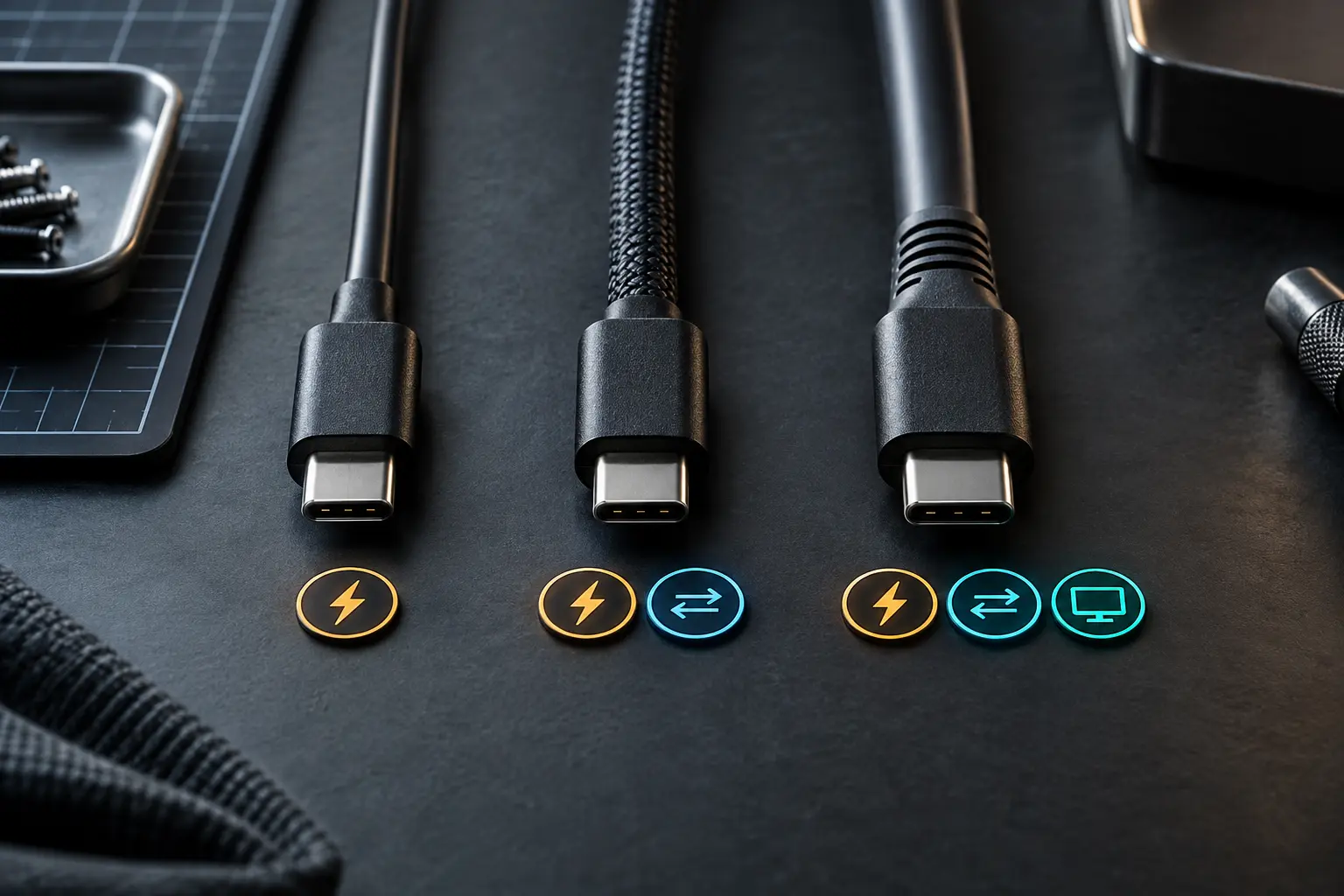
Treat power, data and video as three separate jobs
Power
Ask how much power the destination device requires, which USB Power Delivery profiles the charger and device negotiate, and what current and power the cable is documented to carry. USB Power Delivery can support high-power applications when the entire Extended Power Range chain is designed for them. The number on a cable listing is not the power your device will automatically receive.
A cable also does not turn a weak charger into a strong one. The source must provide the required profile, the device must request it and the cable must safely support it. When a laptop charges slowly, inspect the charger, port and device requirements before blaming the cable.
Data
USB-C cables can range from basic USB 2.0 data to much faster USB and USB4 modes. Marketing may emphasize charging while leaving data speed obscure. If the job includes an external SSD, camera ingest, dock or network adapter, require an explicit data rate from a trustworthy manufacturer specification. “High speed” is not a rate.
Video
A USB-C-shaped port may carry DisplayPort Alt Mode, USB4 or Thunderbolt video—or no video at all. The computer, port, cable, dock and display path must agree. A cable advertised for charging and data may still lack the capability needed for a monitor. Check the computer manual first, then the dock and display requirements.
Choose by use case
| Use case | Require in writing | Usually unnecessary |
|---|---|---|
| Phone or tablet charging | Device-required power, suitable length, documented USB-PD support when needed | Maximum data speed if the cable never transfers files |
| Laptop charging | Charger profile, cable power rating and device requirement | Video support for a charge-only location |
| External SSD | Data rate that matches the drive and host plus adequate power | Extreme power rating when the drive is bus-powered within normal limits |
| Single monitor | Host video mode, resolution/refresh requirement and cable support | Claims about charging if a separate power adapter is used |
| Docked laptop | Shared bandwidth, display mode, downstream ports and power delivery | Buying a cable before reading the dock's included-cable requirement |
| General travel spare | The highest common job you actually expect, clearly labeled | A vague “all-in-one” claim with no specifications |
Read capability labels, not decorative language
The USB Implementers Forum has moved consumer-facing logos toward explicit data rates and power ratings. When a certified logo is legitimately used, it can make the intended capability easier to identify. But a printed symbol is useful only if it applies to the exact cable and is backed by traceable documentation.
Look for a specific data rate, a specific power rating, cable length and support for the mode your equipment requires. For USB4 or Thunderbolt equipment, follow the host and accessory manuals rather than assuming every USB-C cable is interchangeable. Intel's Thunderbolt guidance also stresses certified products and the shared connector's different capability levels.
Do not infer performance from braid, connector color, thickness or price. Construction can affect durability and signal performance, but appearance is not a specification. A short plain cable with precise documentation can be a better purchase than an expensive braided cable described only as premium.
Length changes the tradeoff
Higher data rates become harder to maintain over longer passive cables. Some long high-performance cables use active electronics. Active cables can solve a specific distance problem, but they may have direction, compatibility or mode limitations. Read the exact documentation instead of assuming active means universally better.
For a desk, use the shortest length that allows strain-free routing and normal movement. For travel, avoid a cable so short that it pulls on the port or so long that it becomes a knot and voltage-drop problem. Mechanical strain can damage expensive devices even when the electrical specification is correct.
Build a small cable inventory instead of a mystery drawer
Most households do not need every cable to do everything. They need a few known roles: dependable high-power charging, a verified high-speed data cable, a display-capable desk cable and inexpensive low-consequence charging leads where appropriate. Standardizing those roles reduces both cost and troubleshooting time.
Keep the capable cable with the equipment that depends on it. A dock cable belongs at the dock; a storage cable belongs with the drive. For loose spares, use durable labels at both ends. Record purchase model and documented capability in a simple note if replacement would otherwise require repeating the research.
Retire unknown cables from high-consequence jobs. An unidentified cable can remain useful for basic charging after inspection, but it should not become the silent dependency behind a backup transfer, presentation display or laptop power setup. The goal is not a drawer full of premium cables. It is a small set of known links whose jobs are visible.
The five-minute buying workflow
- Name the job: charge, data, display—or an explicit combination.
- Read the endpoint manuals: record the port modes, required power and desired data/display performance.
- Set minimums: write the lowest acceptable power, data rate, video mode and length.
- Verify the exact cable: use the manufacturer's model-level specification or a legitimate certification listing.
- Label it when it arrives: record capability on a reusable tag so the household does not have to rediscover it.
A simple label such as “charge 100 W / data 10 Gbps / display yes” is more useful than remembering where the cable was purchased. Do not copy a capability onto the tag until the specification is confirmed. If a cable is unknown, label it “unknown” and reserve it for low-consequence charging until verified.
What not to buy
- A cable described only as fast, universal, premium or future-proof.
- A high-power cable when the seller does not state the exact rating or certification basis.
- A cable for a monitor when the listing never names video or the required mode.
- An unusually long high-speed cable with no active/passive explanation.
- A mystery multipack for storage, docking or high-power charging where failure wastes more than the discount saves.
- A cable whose only evidence is marketplace reviews discussing durability rather than measured capability.
When the connection fails
Change one variable at a time. Confirm the device port. Use the original charger or dock cable when available. Remove adapters. Lower the display resolution or data demand only as a diagnostic step. Test with a known-good, correctly specified cable. A successful lower-demand test suggests a bandwidth, mode or power boundary; it does not prove which component is defective.
Stop using a cable with damaged insulation, loose connectors, abnormal heat or intermittent power. Do not repair high-power USB-C cables. Replace them with a documented cable suitable for the job.
Commercial disclosure: Life in the Simulation has no approved affiliate program for this domain, so this guide contains no paid product links. Official specification and certification resources are direct, non-affiliate links. No pictured or discussed cable was hands-on tested, rated or endorsed by the publication.
Official compatibility sources
- USB-IF USB Type-C Cable and Connector Specification, for the connector and cable standard.
- USB-IF USB Charger and USB Power Delivery, for current power-delivery information.
- USB-IF logo and certification information, for legitimate consumer capability marks.
- Intel Thunderbolt overview, for Thunderbolt capabilities and certified-device context.
END OF FIELD GUIDE 057
Keep the question. Test the model.
Choose the narrowest claim the evidence can carry, then leave room for revision.