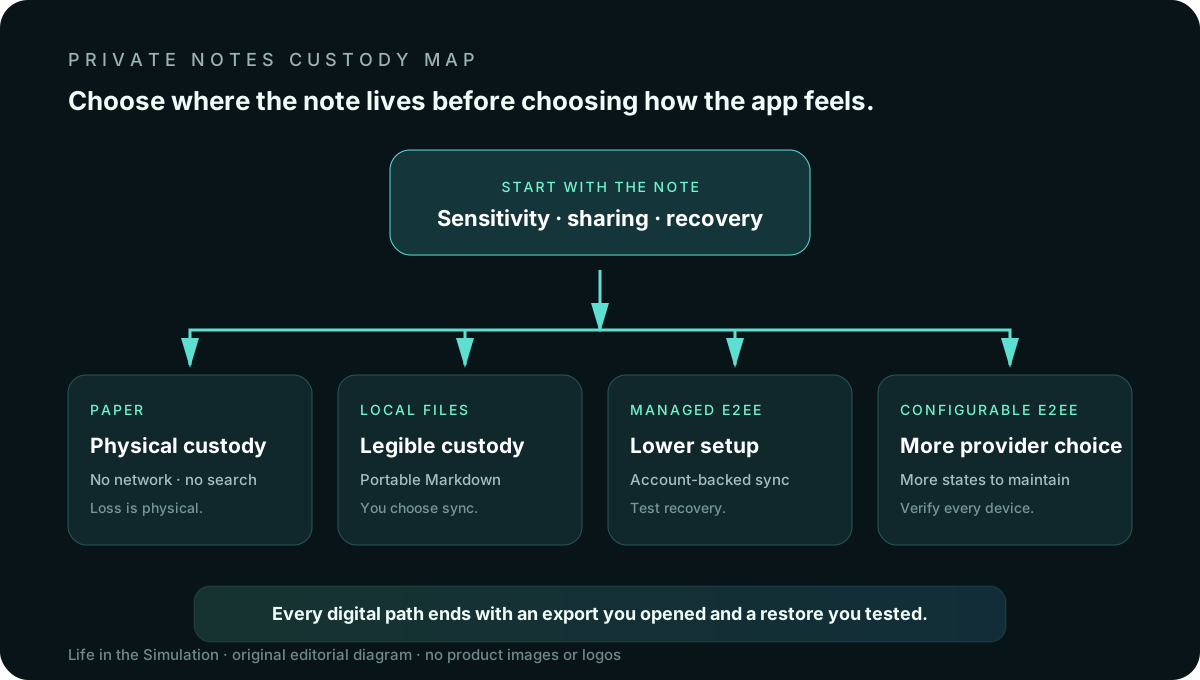
A private note system is not one thing. It may mean notes stay on your device, the sync provider cannot read them, files remain portable, collaborators cannot accidentally expose them, or the app collects little metadata. Those are different promises with different failure modes.
Start with the note, not the app
Write down what could go wrong. A shopping list, unfinished essay, therapy reflection, recovery code and shared project plan do not deserve the same home. Privacy begins with classification.
- Content risk. What harm follows if the text is read: embarrassment, account takeover, professional damage or physical danger?
- Device risk. Are you defending against a lost phone, a shared computer, malware or a compelled device unlock?
- Provider risk. Must the sync service be unable to read content, or is ordinary account security sufficient?
- Collaboration need. Does anyone else need to edit the same note? Sharing changes the trust boundary.
- Exit requirement. Which files, attachments, links, dates and tags must survive an export?
End-to-end encryption can protect content in transit and on a provider's servers. It does not secure an unlocked device, stop screenshots, make collaborators trustworthy or guarantee that every piece of metadata is hidden. “Encrypted” is a property of a path, not a blessing applied to the whole workflow.
Standard Notes: managed encrypted sync
Standard Notes says its apps use end-to-end encryption and keep an offline copy, while its code is open and its applications have undergone independent audits. The product is designed around an account-backed encrypted notebook rather than a folder of ordinary files.
Fits: someone who wants encrypted cross-platform sync with fewer decisions about storage providers. Tradeoff: richer editors and some backup conveniences depend on the current plan; the application data model is more specialized than a folder of Markdown files. Verify before committing: current free-plan editor limits, file support, export formats, recovery procedure and whether the collaboration mode preserves the protections you require.
Choose it when reducing configuration is itself a security feature. Skip it when your primary requirement is editing the same plain-text folder with many other tools.
Joplin: open source and configurable sync
Joplin is open source, supports Markdown-oriented notes and can synchronize through Joplin Cloud or other targets such as Nextcloud, S3, WebDAV, Dropbox, OneDrive and a local filesystem. Its documentation says end-to-end encryption can protect synchronized note content.
Fits: a person willing to configure sync in exchange for provider choice, plugins, a web clipper and broad desktop/mobile support. Tradeoff: more control creates more states to understand. Encryption must be enabled and completed across devices; a sync target is not the same thing as a backup; plugins expand the trusted code surface.
Joplin's official export documentation distinguishes its lossless JEX backup format from more portable outputs such as HTML and PDF. A sound exit drill tests both: a complete restore for recovery and a readable export for migration.
Obsidian: local files first
Obsidian stores notes locally and works with Markdown files in a vault. It can be used without an account, while optional Obsidian Sync adds end-to-end encrypted synchronization, version history and shared vaults. Local files make custody legible: the notebook is a directory you can inspect, copy and back up.
Fits: linked notes, long-lived writing and people who value files usable beyond one application. Tradeoff: local-first does not automatically mean private. A vault placed in an ordinary cloud folder inherits that provider and sync tool's security. Community plugins can read or modify vault contents. Mobile synchronization and conflict handling need an intentional setup.
Choose Obsidian when file ownership and extensibility outrank a sealed, managed experience. Use fewer plugins than curiosity suggests, and review their permissions and maintenance before letting them into sensitive notes.
Paper: the honest no-buy option
Paper has no cloud account, telemetry, sync conflict or remote breach. It also has no access control beyond physical custody, no searchable backup and no remote wipe. A notebook left on a desk is available to anyone who can open it.
Fits: temporary thinking, private drafting and low-volume notes that benefit from staying outside a device. Skip it: recovery codes, information that must survive a fire, material that needs collaboration, or anything whose physical discovery would create serious harm.
The no-buy option is especially good for separating thinking from collection. A cheap notebook can protect attention better than a feature-rich app that turns every thought into a system-maintenance task.
The decision matrix
Lowest setup burden for encrypted sync
Standard Notes. Confirm the current plan supplies the editor, files, backups and sharing you need.
Most sync-provider choice
Joplin. Accept the work of configuring encryption, testing every device and maintaining exports.
Most legible file custody
Obsidian. Plain Markdown lowers exit friction; your sync method and plugins remain part of the threat model.
No network and no subscription
Paper. Physical control replaces account security, and physical loss replaces cloud loss.
Run a seven-day migration before trusting it
- Select twenty representative notes. Include links, tags, attachments, checklists and one long document. Do not import the entire archive first.
- Configure the smallest useful feature set. One editor, one sync path, no speculative plugin collection.
- Protect the account. Use a unique password, supported phishing-resistant authentication and a recovery plan. The security-key guide explains when separate hardware helps.
- Test offline editing. Change the same note only after confirming how conflicts appear; do not manufacture a conflict with irreplaceable work.
- Export on day one. Open the exported files outside the app. Check attachments, titles, dates and internal links.
- Restore into a clean profile. A backup is a claim until a restore succeeds.
- Decide by failure recovery. Keep the system whose loss, lockout and migration procedures you can explain to another person.
What should not live in a normal notes app
- Passwords and one-time recovery secrets. Use a maintained password manager designed for secret handling.
- Unnecessary identity documents. Minimize copies before optimizing storage; use the data-minimization protocol.
- Work material your organization governs. Employer policy, retention rules and legal duties override a personal preference for a consumer app.
- Evidence whose integrity must be proven. Notes are useful context, not automatically an authenticated evidentiary archive.
Official sources and volatile details
- Standard Notes: encryption, offline copy and product overview.
- Joplin: end-to-end encryption documentation and import/export documentation.
- Obsidian: local storage, privacy and current pricing and Sync features.
This guide compares documented architectures and workflows, not audited guarantees for a particular threat. Review current security documentation and seek qualified organizational or legal guidance for regulated, journalistic, medical or high-risk material.
END OF FIELD GUIDE 020
Keep the question. Test the model.
Choose the narrowest claim the evidence can carry, then leave room for revision.